— Supporting Unicode since 2002 —
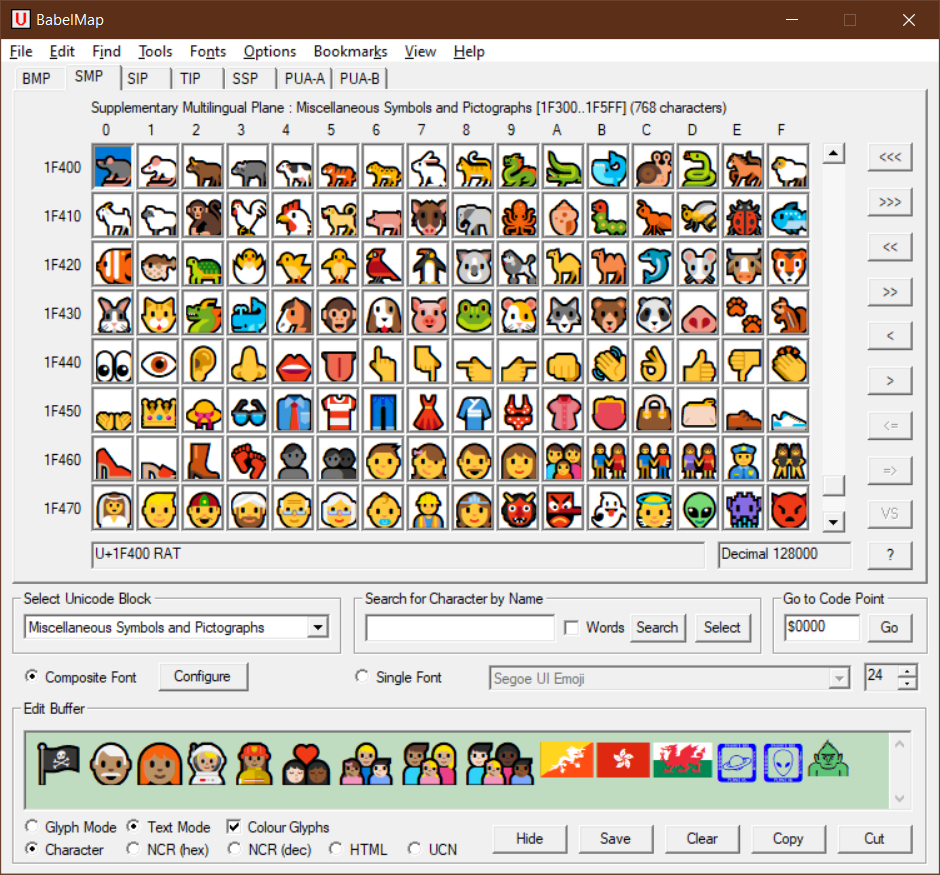
BabelMap is a free character map application for Windows developed by Andrew West that allows you to browse through the entire Unicode character repertoire of nearly 155,000 characters, or search for a particular character by name or by code point. Characters can then be copied to the clipboard for use in any Unicode-aware application. It also provides many useful features and special utilities. BabelMap was first released in 2002 (Unicode 3.2), and is updated for each new release of the Unicode Standard. The current version supports Unicode 16.0 which was released on 10 September 2024.
These are some of the key features of BabelMap. For more information see the BabelMap Help pages.
BabelMap and BabelPad are Windows desktop applications written in C++ using the MFC architecture. The two applications share a common code base, and the release versions are built using Microsoft Visual Studio 2008 (I cannot upgrade to a more recent version as applications built using later versions of Visual Studio do not run on Windows XP or earlier, and I am committed to supporting Windows 2000 upwards for as long as my old laptop keeps going). Up to 2008 (Unicode 5.1), BabelMap and BabelPad were released in two versions, one designed to run on Windows 95/98/Me (which have no native support for Unicode, but can nevertheless display all Unicode characters if you try hard enough), and one more fully-functional version that only runs on Windows 2000 and later. Support for Windows 95/98/Me was discontinued in 2009 after I lost access to my test PC.
BabelMap and BabelPad utilize the fonts installed on your computer to display Unicode text, and so can only display Unicode characters that are available in fonts on your system (this is a deliberate design limitation). In text mode (BabelPad edit view and BabelMap edit buffer) text is rendered using the Uniscribe (usp10) API, specifically the ScriptStringOut() function. This ensures that no automatic font substitution ever occurs, and the user-selected or user-configured font is always that font used to display the text. In glyph mode (BabelPad edit view and BabelMap edit buffer) and within the character map grid, all characters are displayed using the WinGDI function ExtTextOutW(), but with characters selected by font glyph index rather than their Unicode value (this means that the software first parses the selected font's cmap table to obtain the desired glyph index of each character to be displayed). As the software relies on Windows to render Unicode text (when in text mode), support for complex scripts may vary for the same version of BabelMap or BabelPad depending on the version of the Windows operating system the software is running on. Some complex scripts that have only been added to the Unicode Standard in recent years may not display correctly (i.e. no expected shaping or joining behaviour) when the software is run on an old version of Windows (e.g. XP, Vista, 7), but will display correctly when the software is run on a current version of Windows (e.g. 10 or 11). Therefore, for optimal Unicode support it is best to run BabelMap and BabelPad on a recent version of Windows.
BabelMap is free to download and use for personal or commercial purposes. This free version is fully-featured, with no functional or time limitations, no adverts, no in-app purchases, and no malicious features. BabelMap is distributed as a single executable file (no installer). Simply download and unzip the single executable file (BabelMap.exe), and then run it from the desired location on your computer (recommended to run it from a subfolder of the "Program Files" directory). BabelMap runs on Windows 2000, XP, Vista, 7, 8, 8.1, 10, and 11. For support, bug reports, or feature requests, please email me (Andrew West) at the email address given in BabelMap's About box. Please do not download BabelMap from any site other than babelstone.co.uk. I do not provide support for third-party distributions of BabelMap, such as BabelMap Portable from PortableApps.com.
| BabelMap | Version 16.0.0.6 (2024-12-05) | Download | Release notes |
| BabelPad | Version 16.0.0.6 (2024-12-05) | Download | Release notes |
A beta version of BabelMap supporting Unicode 17.0 beta is available for testing from the beta download page.
The latest version of BabelMap runs on Windows 2000 or later. An unsupported old version of BabelMap (supporting Unicode 5.1) that runs on Windows 95/98/Me is available for download here.
An unsupported version of BabelMap (supporting Unicode 4.1) that is localized for French, with French character names and Unicode data, is available for download here. A version of BabelMap Online (supporting Unicode 7.0) with French interface and French Unicode data is available here. My great thanks to Patrick Andries, Alain LaBonté, and Francois Yergeau for creating the French Unicode data and for help in translating the user interface for BabelMap and BabelMap Online.